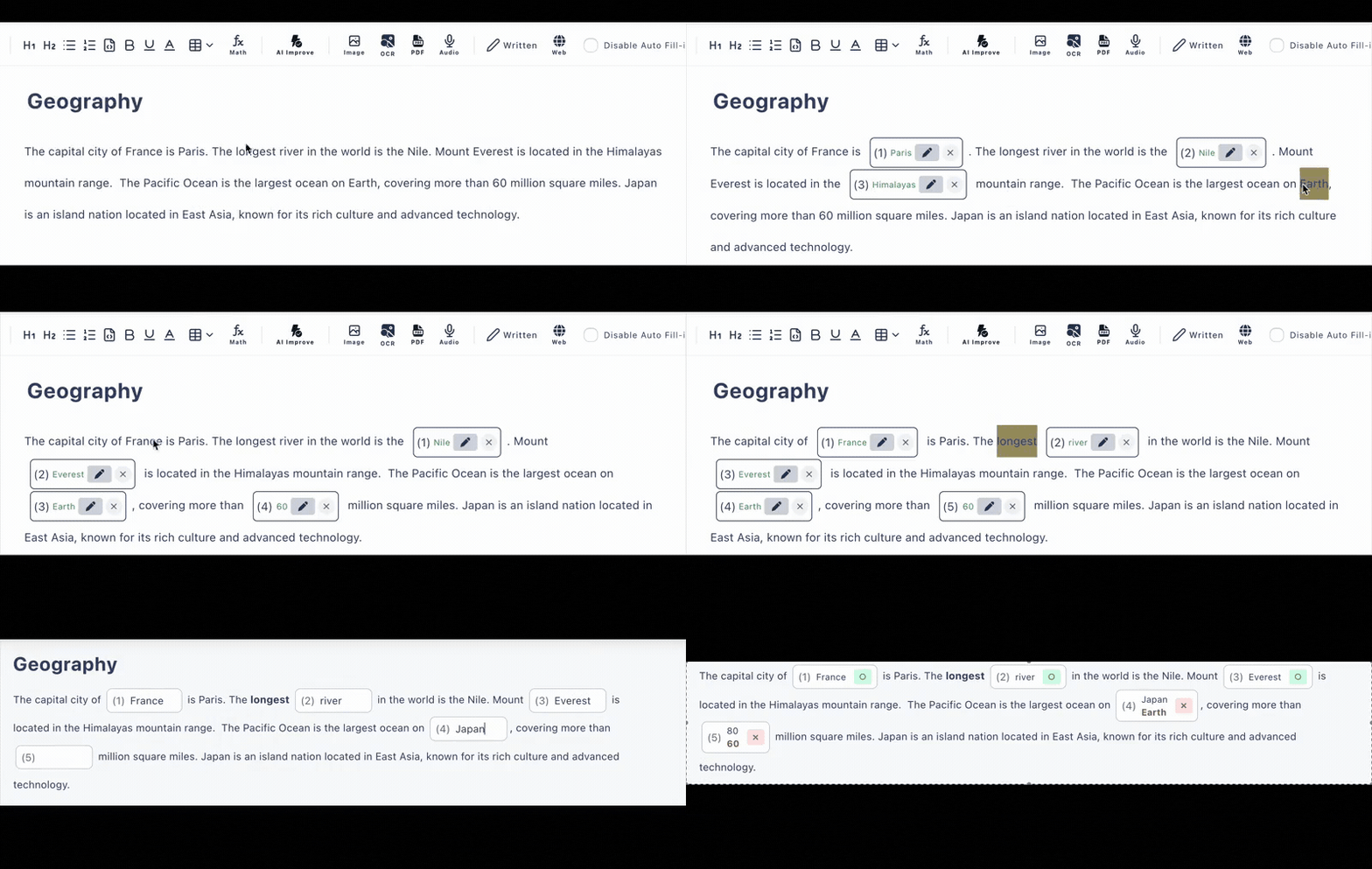
Turn English text into fill-in-the-blank tests with just a selection.
Transform TOEIC, EIKEN, and class handouts into "3-minute quizzes" with automated grading
Create from PDFs, images (OCR), web articles, or pasted text. AI generates incorrect choices, handles multiple correct answers and case variations.
- •No need to retype materials: Import from PDFs, images, and URLs (OCR supported)
- •Strong against "English quirks": Case-insensitive grading, multiple correct answers, multiple choice
- •Fast distribution: Just share a URL. Works with Classroom, LMS, and email
Try it on this page now (scroll down)
Creating English fill-in-the-blank tests is easy. Making them "effective for learning" is hard.
You can create English fill-in-the-blank tests by copying text and making blanks. However, in actual classroom, exam prep, and training situations, these are the real challenges:
- ✗Blank creation tends to be repetitive: You want to target important phrases, but end up just "randomly removing words"
- ✗Poor incorrect choices don't help learning: Obviously wrong choices become guesswork and don't stick in review
- ✗Grading becomes inconsistent due to variations (uppercase/lowercase, singular/plural, alternative answers): "Correct but marked wrong" breaks the learning experience
- ✗Distribution and collection take too much time: Distribution → collection → grading → result sharing is heavier than question creation itself
Test Maker integrates creation, distribution, grading, and review, addressing these "English quirks" from the start.

English fill-in-the-blank tests are a complete set: "Material → Blank Creation → Distribution → Review"
Here, we organize 4 common use cases as user stories (workflow). Choose the one closest to your situation and follow it directly.
Story 1: School Classes (Text, Example Sentences, Vocabulary Retention)
Material: Textbook text / Handouts (PDF available)(小テスト作成ツールもご覧ください)
Blank Creation: Select only the phrases you want students to understand and make them blanks
Tips to improve learning effectiveness:
- •Remove only points that change meaning, such as "subject, verb, preposition, conjunction"
- •Add hints or explanations to confusing parts to complete them during review
Distribution: Just share the URL (OK to paste in Classroom)(Google Classroom連携の詳細はこちら)
Collection & Grading: Automatic grading upon submission, stumbling points visible at a glance
Story 2: TOEIC Part 5 ("Quality of Choices" is Key)
Material: Practice book PDFs / Original example sentences
Blank Creation: Target parts that require reasoning for selection, such as parts of speech, prepositions, tense
Choices: Generate incorrect choices with AI to create 4-choice questions that are confusing but educational
Review Flow: Review only incorrect questions and read explanations (make it review-oriented)
Story 3: EIKEN & Entrance Exam Long Passages (Add "Confirmation" Without Losing Reading Comprehension)
Material: Long passages (PDF/URL/paste)
Blank Creation: Remove demonstratives, conjunctions, and important vocabulary rather than proper nouns
Grading Pitfall: Absorb variations (e.g., case-insensitive)
Story 4: Business (Email, Meetings, Regulations - "Work-Relevant" English)
Material: English emails / Procedure manuals / Company wiki (PDF/URL)(企業向けプランの詳細はこちら)
Blank Creation Policy: Target collocations (e.g., make a decision), polite expressions (e.g., would you~), and frequent expressions
Effectiveness Measurement: Review answer history and repeat only weak expressions (weekly quiz format)
5 Features Specialized for English Learning
Mouse/Touch Instant Creation
The biggest waste in English fill-in-the-blank creation is "typing work." Just paste text and select phrases you want to blank out. Difficulty can be adjusted by the "amount removed."
AI Incorrect Choice Generation (Core of English Learning)
In English multiple-choice questions, learning effectiveness is determined by the quality of incorrect choices. AI provides contextually appropriate incorrect candidates, so review goes all the way to "why that's wrong."
Multiple Correct & Selection
English has alternative answers. Handles situations where "there is more than one correct answer" in both classes and exams.
Case-Insensitive Grading
"Know it but marked wrong" stops learning. Absorbs case variations to focus evaluation on content understanding.
Easy URL Sharing
It's not just creation - distribution → collection → review is one set. Just paste a URL to distribute, suitable for Classroom use.
Try It Out Now
- テキストを選択して穴埋め問題を作成してみましょう
回答画面の例
いろんなテストの作成例:
実際の英語テスト作成例
ビジネス英語・TOEIC対策に特化した穴埋め問題の作成機能
1PDF・画像から瞬時に取り込み
英語教材のPDF、TOEIC問題集のスキャン画像、Web記事など、様々な素材を取り込み可能。OCR機能で画像内のテキストも自動認識します。
2マウス選択で穴埋め箇所を指定
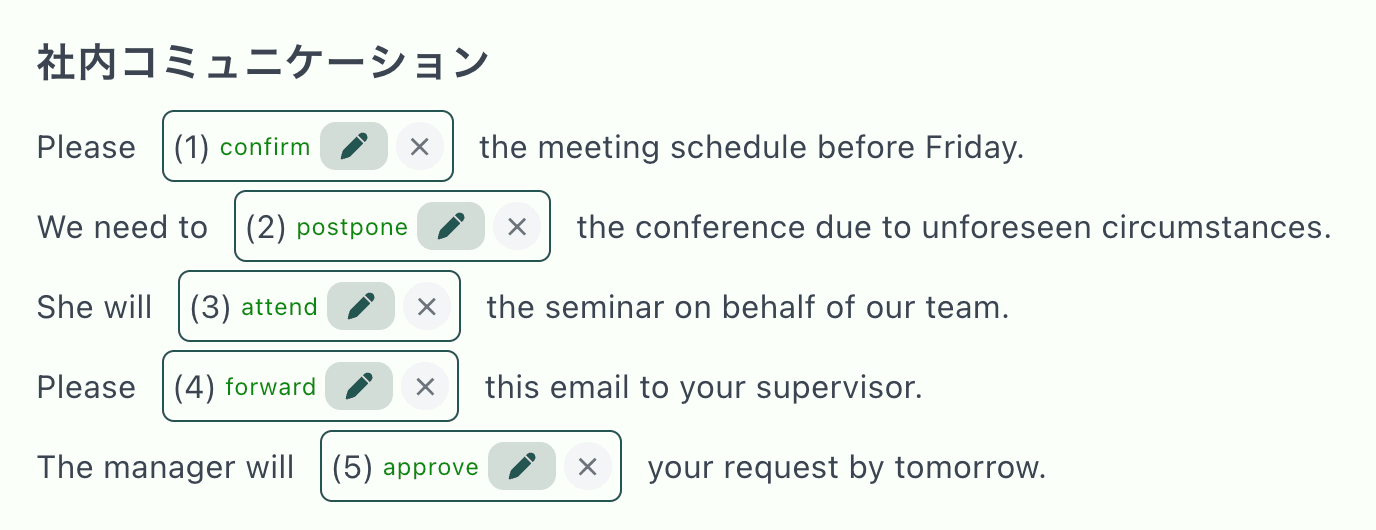
テキストをマウスで選択するだけで、その部分が穴埋め問題に。編集ボタンから選択肢の追加や解説の設定も可能です。
3選択式・ドロップダウン形式に対応
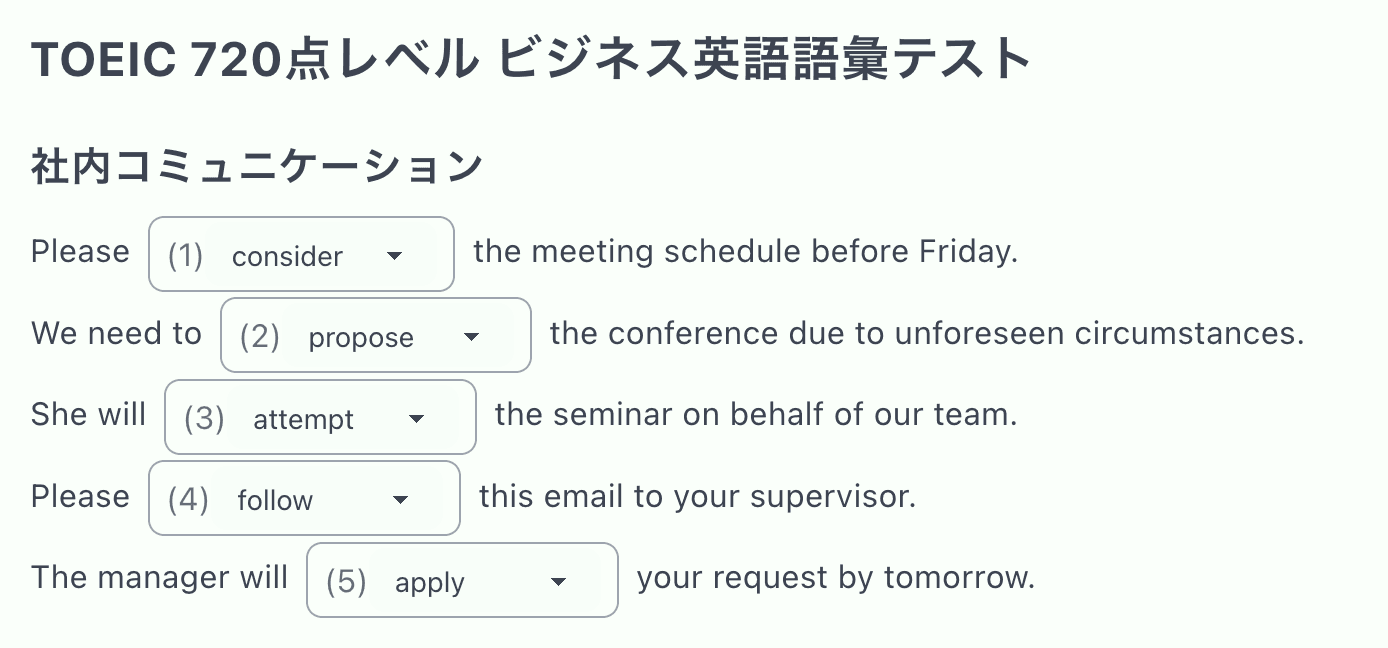
記入式だけでなく、ドロップダウンから選ぶ形式にも変更可能。TOEIC Part5のような選択問題形式で学習効果を高めます。
4自動採点と解説表示
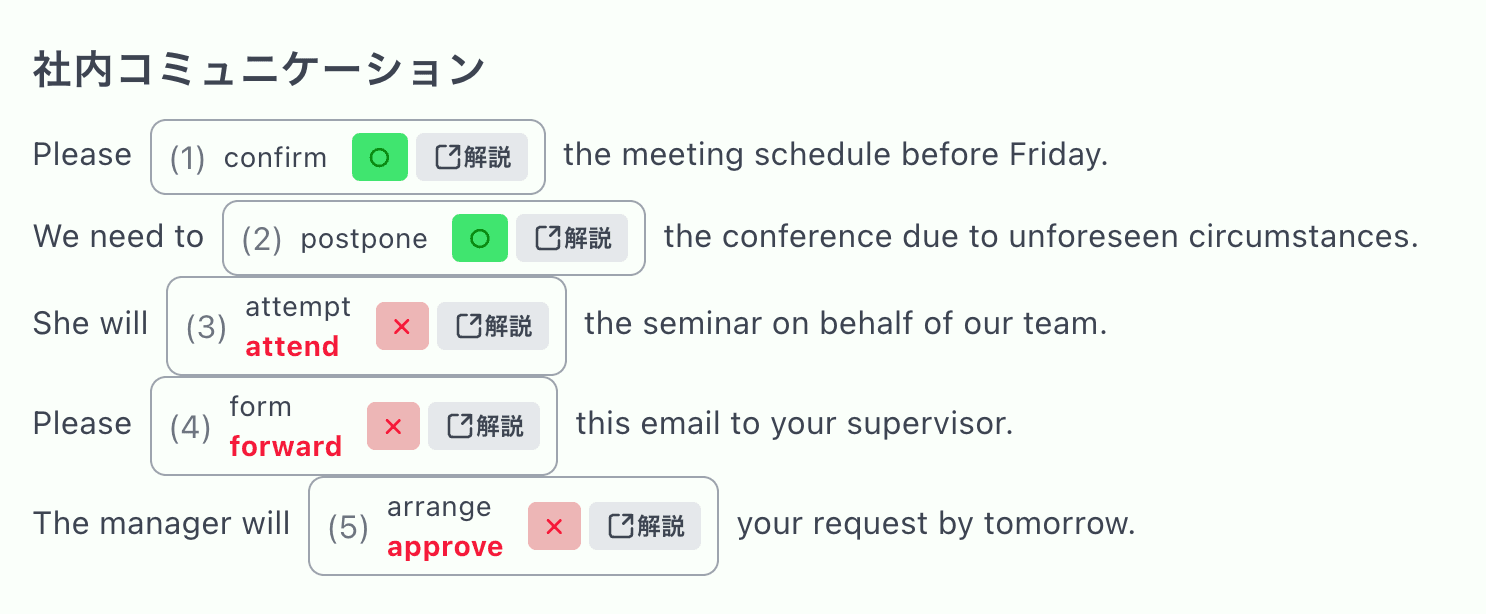
回答後すぐに○×で正誤判定。解説ボタンで詳しい説明を確認でき、間違えた問題の復習も効率的に行えます。
You can create with Google Forms too. But for "English fill-in-the-blank," the effort jumps.
Google Forms is convenient, but when creating fill-in-the-blank (cloze) tests with English long passages, it tends to become "manual input question by question." Test Maker creates blanks directly from text and handles grading end-to-end.
| 項目 | Googleフォーム | テストメーカー |
|---|---|---|
| Creation Time | Long (input question by question) | Short (instant with mouse selection) |
| Freedom of Blank Placement | Low (one question per answer format) | High (blank anywhere in the text) |
| Can Create from Material PDFs | Difficult | Easy (can create directly from PDFs) |
| Quality of Incorrect Choices | Need to think manually | Auto-generated by AI (contextually appropriate choices) |
Use in Every English Education Setting
English Classes & Fill-in-the-Blank Test Creation for Middle/High Schools
Transform textbook English passages, grammar examples, and vocabulary study texts into fill-in-the-blank questions with one click. OCR feature converts paper textbooks to digital text, direct import from PDF handouts available. Measure English reading comprehension, vocabulary, and grammar understanding in real-time to effectively track student English learning progress. Dramatically reduce time spent creating regular tests, quizzes, and homework assignments.
TOEIC, EIKEN & University Entrance Exam Preparation Practice
Create questions directly from TOEIC official workbook PDFs, EIKEN past paper PDFs, university exam prep book PDFs. Easy import of online English articles and practice tests via URL input. Efficiently create fill-in-the-blank practice questions from TOEIC Part 5 grammar questions, Part 7 reading passages, EIKEN reading comprehension, and university entrance English texts. Simultaneously achieve vocabulary strengthening, grammar acquisition, and reading speed improvement necessary for English test preparation.
Personal English Learning & Conversation Skills Enhancement
Create personalized fill-in-the-blank questions from business English materials, conversation textbooks, news articles, and English books. Focus on strengthening reading comprehension and vocabulary among the four English skills (reading, writing, listening, speaking). Self-study support system that dramatically improves English learning memory retention, understanding assessment, and review efficiency.
Corporate English Training & Business English Education
Create practical English fill-in-the-blank questions directly applicable to work from business emails, presentation materials, contracts, and industry terminology. Effectively support employee English communication improvement, TOEIC group test preparation, overseas expansion preparation, and international conference participation skills. Easy measurement of HR training and language education outcomes.
Frequently Asked Questions
Can I create 4-choice questions like TOEIC Part 5?
Yes. You can make fill-in-the-blank questions multiple choice, and incorrect choices can be generated by AI (number of uses varies by plan).
Will I get marked wrong for uppercase/lowercase (Apple / apple)?
Case-insensitive grading is supported. This makes it easier to measure learner understanding.
Can I create if I only have PDF materials?
PDF and image import (OCR) is supported. You can create without retyping.
How do I distribute? Do test takers need to log in?
You can distribute via URL sharing. Depending on your plan, settings like login required or name required are also available.
What are the free plan limitations?
You can create, distribute, grade, and check answer history even on the free plan. The number of private (non-public) creations, answer history limits, and AI feature usage vary by plan.
他のLPもご覧ください:小テスト作成ツール / Google Classroom連携 / 単語テスト作成
Plans Perfect for English Education
- Create tests (up to 3 private exams)
- Distribute tests by URL
- Grade tests
- View answer history (up to 10)
- Create multiple-choice questions
- Create questions with hints and explanations
- Unlimited test creation!
- AI test generation 20 times/day!
- AI choices generation 30 times/day!
- AI math generation 20 times/day!
- Up to 300 answer history!
- More than 4 choices for multiple-choice questions
- Grading that does not distinguish between uppercase and lowercase
- Login required to answer
- Mandatory naming required to answer
※Supports TOEIC, EIKEN, university entrance exams, and all English learning needs
Start Creating English Fill-in-the-Blank Tests
©2025 Test Maker
For inquiries: Feature Request Form